Skip to content

czPlayer 0.1.1 released

New release of czPlayer.
Just a few bug fixes in the internal mixer, and minor changes in the documentation.
Those bugs were particular hard to find and fix. They appeared mostly for short looped sounds, like those commonly used in chiptunes, causing some distortion or high pitch. I was making some wrong calculations for looped sounds, which caused 1 or 2 sound frames to be skipped for each sound. For big samples, you can’t hear the difference, but for very short samples, especially looped, just 1 or 2 wrong frames can mess up the final mix, since they represent a significant part of the affected samples.
I have a lot of changes planned, but  I’m waiting for a client to  finish  his game before I go wild on the code! hehe

Download lastest czPlayer demo.

First public version of czPlayer Sound System (0.1.0)

I’ve just released the first public version of czPlayer Sound System.

There are still things to improve and features to add, but a client is already using it as-is, so I chose to release it right after some documentation updates and small fixes/improvements. I have a huge list of things I want to improve, but I know myself. I’m a perfectionist, and as a result I’m never really happy with my code. So if I just kept on this cycle, I would never release it ! :)
Better release something and work from there, than to be stuck improving and never release it.

As some of you might know already. czPlayer it’s a multiplatform sound system for games. Right now it supports Windows, Windows Mobile (PocketPC/Smartphone), Symbian, and PalmOS (full ARM with prc-tools). The formats supported so far are MOD and IT for music, and WAV for sound. The next ones to come are probably ADPCM and Ogg Vorbis, but that depends on the needs of my clients, and the priority of others things left to do.

If you’re interested in a commercial license, or using it in freeware, check it out: czPlayer Sound System

Good UML Design Tool


In some previous posts I talked a little about UML, but I never talked about what tool I use.

I have already tried a few.

- BOUML

- UML Pad

- Rational Rose . Only used some years ago, and never liked it.

- Visual Paradigm for UML

So far, and by far… the one I like the most is Visual Paradigm for UML . The first time I looked at it, it scared me a little, with all the buttons, and functionality. But its quite a complete package. Great documentation, somewhat clutter free windows (considering the amount of functionality), and an amazing intuitive interface, that can get you going in no time.

For example, in a State Machine Diagram, just place the initial state, and you can do most stuff from there without ever leaving the design area, simply pulling the other states from that one. Mouse gestures really help with productivity. First time I discovered those, it reminded me of “Black and White”. Depending on the kind of diagram we are working on, we’ll have some specific gestures available. For example, in a Class Diagram, we have a gestures to create classes, packages, add operations, attributes, and so on.

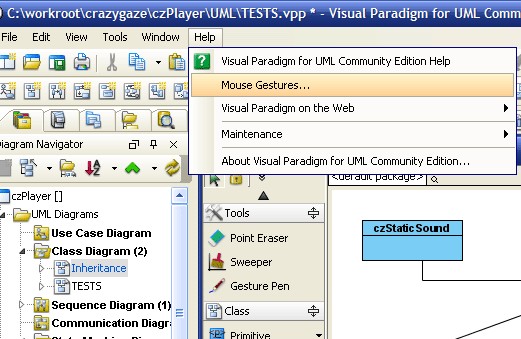
Most gestures are easy to remember, but to make things even easier, we even have a fast lookup window:

visual-paradigm_1.png (521x339 pixels)

That menu option will show you the available mouse gestures for each diagram type, like this:

visual-paradigm_2.png (410x511 pixels)

Thumbs up for Visual Paradigm. Really intuitive interface, that can really boost productivity.

Of course it has a lot more features, but the productivity boost was the most interesting to me.

If you’re looking for a good UML tool, give it a try. Maybe you’ll like it too. You can always use the Community Edition for a while, which is free for non-commercial use.